

How to Get Started with Machine Embroidery Design
Machine embroidery is a fun way to turn art into stitched designs on fabric. It is used for making logos, clothes, gifts, and custom items. Many people want to start but are unsure where to begin. Learning the basics can help you make clean and professional designs.If you are new, it is helpful to know How to learn embroidery digitizing.
Digitizing is the process of turning a picture or design into a file that an embroidery machine can read. Once you understand digitizing, you can create your own designs and make them ready to stitch.In this guide, we will explain step by step how to start with machine embroidery design. You will learn the tools, techniques, and tips to get your first design stitched with confidence.
What Is Machine Embroidery Design?
Machine embroidery design is the process of preparing artwork for stitching. A machine cannot read regular image files like JPG or PNG. It needs a special file that shows:
- Where each stitch starts and stops
- How thick the stitches should be
- The direction of stitches
- The thread color for each area
Digitizing converts your idea into this format so the machine can stitch it perfectly.
Why Digitizing Is Important
Digitizing is a key part of embroidery design. Without it, your machine cannot create the design.
Good digitizing helps in:
- Making smooth and even stitches
- Avoiding thread breaks
- Keeping the fabric flat and neat
- Ensuring small details are visible
Learning this skill gives you control over your designs. Professionals rely on proper digitizing to make quality embroidery.
Tools You Will Need
Before you start, gather a few tools to make the process easy.
1. A Computer or Laptop
You need a computer or laptop to run embroidery software. It also helps you edit images and check designs.
2. Embroidery Software
Software lets you trace your design and convert it into a stitch file. You can start with free or paid software depending on your budget.
3. A Simple Image
Choose an image or logo that is clear and simple. Complex images are harder to digitize at the beginning.
4. An Embroidery Machine
A machine is needed to stitch the design. Most machines read standard embroidery file formats like DST or PES.
Steps to Start Your First Embroidery Design
Creating a design can be broken down into clear steps.
Step 1: Pick a Simple Design
Start with something small and simple. Good beginner designs include:
- Names or text
- Small logos
- Basic shapes
- Icons
Avoid images with too many colors or tiny details.
Step 2: Prepare the Artwork
Before digitizing, clean the image.
- Remove backgrounds
- Smooth rough edges
- Reduce colors if needed
A clean image makes tracing easier.
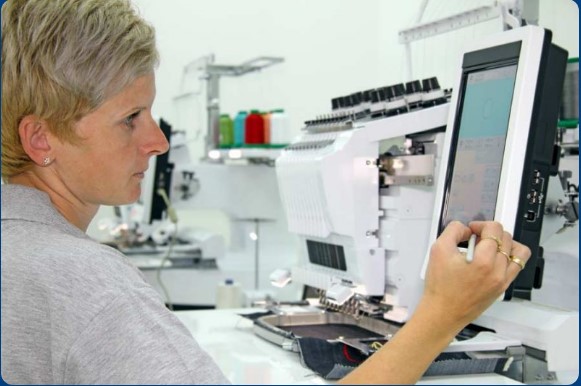
Step 3: Import the Design into Software
Load your image into the embroidery software. This will be your guide for stitching.
The software lets you trace shapes and assign stitch types to different areas.
Step 4: Trace the Design
Tracing is the process of outlining each shape in your image.
- Use the software’s drawing tools to mark areas
- Each section will become a stitch area
- Adjust shapes to make stitching smoother
Tracing is important for clean and accurate stitching.
Understanding Stitch Types
Different parts of a design may need different stitches.
Running Stitch
A running stitch is a single line of thread. It works well for outlines and thin details.
Satin Stitch
Satin stitches are smooth and shiny. They are great for borders, letters, and narrow shapes.
Fill Stitch
Fill stitches cover large areas. They are used for logos, patches, and big shapes.
Planning Stitch Direction
The direction of stitches affects how the design looks.
- Align stitches with the shape of the design
- Good direction makes shapes smooth
- It also helps light reflect nicely on threads
Plan stitch angles for each section carefully.
Setting Stitch Density
Stitch density is how close the stitches are to each other.
- Too tight: fabric may wrinkle
- Too loose: gaps appear
Adjust density based on fabric type. Thick fabric needs denser stitches, while thin fabric needs lighter ones.
Adding Underlay Stitches
Underlay stitches are the base of the design.
- They sit under top stitches
- Help hold fabric in place
- Support the design for cleaner results
Almost every professional embroidery file includes underlay stitches.
Choosing Thread Colors
Thread colors replace ink in embroidery.
- Pick colors that match the image
- Fewer colors make stitching faster
- Too many colors slow down the machine
Simple color planning is better for beginners.
Testing Your Design
Always test your design on fabric before final stitching.
Check for:
- Smooth stitch flow
- Clean edges
- Correct colors
- Balanced stitch density
Testing helps you catch problems early.
Common Beginner Mistakes
New designers often make small mistakes.
- Using too many tiny details
- High stitch density
- Wrong stitch direction
- Ignoring fabric type
Practice and testing help avoid these issues.
Tips for Learning Embroidery Design
Start Small
Begin with simple projects and small designs.
Watch Tutorials
Many online tutorials show techniques for digitizing and stitching.
Practice Regularly
Frequent practice improves control and skill.
Test Every Design
Always stitch a test version before final production.
How Experience Makes a Difference
Digitizing is both art and skill. Experienced designers know:
- How fabric behaves
- How thread tension affects stitching
- How to plan stitch flow
- How to adjust designs for better results
This experience helps create smooth, professional embroidery files.
Building Creativity with Digital Tools
Embroidery software also boosts creativity.
- You can test ideas quickly
- Easily edit mistakes
- Save multiple versions
- Share designs for feedback
Free or paid software allows beginners to explore design freely.
Real Experience from Embroidery Work
Many beginners start with small designs. Over time, they gain skill and confidence.
A well-prepared file stitches cleanly and looks professional. Poor planning can lead to messy stitches and thread breaks.
Learning digitizing and design basics early makes a big difference.
Final Thoughts
Getting started with machine embroidery design is easier than it seems.
By understanding digitizing, choosing simple designs, and using proper software, beginners can create neat embroidery files.
With practice, testing, and patience, your skill will grow. You will learn how fabric, thread, and stitches work together to make beautiful designs.
Embroidery design is both craft and creativity. Anyone can learn it with the right tools and guidance. Start small, keep practicing, and enjoy the process of turning ideas into stitched art.