



Build Powerful Workflows as an n8n Developer
Welcome! If you want to grow your business, save time, and work smarter with technology, learning how to build powerful workflows as an n8n developer is a great step. In this blog, you’ll learn what n8n is, how it solves real business problems, and how modern artificial intelligence services and IT support specialist teams use it to make amazing automation systems.
What Is n8n and Why It Matters
Think of n8n like a magic connector that lets you link different apps and tasks so they work together automatically.
For example:
- When someone fills your online form → save the info in a spreadsheet
- Then send a message to your team → and add the contact to your CRM
All without you having to click a single button.
This is called a workflow: a set of steps that happen one after another without human effort. A workflow developer is someone who builds and maintains these automated systems so businesses run faster and more smoothly.
n8n is also a place where you can add intelligent actions using artificial intelligence services like AI models that can read text, summarize data, or make decisions.
How n8n Helps Your Business Today
Businesses use n8n for tasks that are boring, slow, or easy to get wrong. Using an n8n workflow:
- Saves time – Work happens by itself.
- Reduces mistakes – Computers don’t forget steps.
- Gives you insight – You see what happened step by step.
- Helps teams scale fast – Your system grows as you grow.
For example, an IT support specialist can automate how support tickets are routed and answered so customers get help faster. An AI service can read incoming messages and decide what action to take next.
What an n8n Developer Actually Does
Being an n8n developer means you:
Build Workflows
You connect steps so they act like a smart machine. Each step can start another action or check a rule.
Connect Apps
You link tools like email, calendar, CRM, messaging apps, and databases. These tools can talk to each other without manual work.
Use Logic for Decisions
Some steps check for “IF this happens, then do that”. This makes workflows smart, not just automatic.
Add Intelligence
You can connect AI models so your system doesn’t just follow steps it thinks. For example, the AI can read a message and decide if it’s a support request, a lead, or spam before taking action.
Step‑by‑Step to Build Your First Workflow
- Pick a Trigger – A trigger is what starts the workflow. Maybe a new lead form submission.
- Set Workflow Steps – Each step could be saving form data, sending notifications, or scoring a lead.
- Add Logic – Use simple if/else checks, like “Is the lead high value?” to choose different paths.
- Test It – Run the workflow with real test data so you know it works right.
- Turn It On – Once tested, it runs automatically forever.
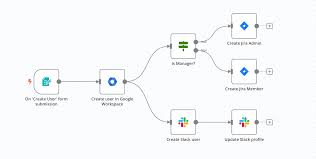
This simple structure works even if you’re new n8n’s visual editor shows all pieces like blocks.
What Makes n8n Different
Unlike other tools:
- You see every step happening and can change it.
- You can add code or AI into steps when needed.
- It has hundreds of built-in connections so almost anything can talk together.
This means a workflow developer can build systems for:
- Sales lead qualification
- Customer support automation
- Content publishing
- IT ticket routing
- Data synchronization between platforms
With n8n’s help, these tasks happen without manual effort.
Real Business Benefits
Here’s what businesses see after using n8n workflows:
Fewer human errors – mistakes drop dramatically
Faster operations – processes happen quickly
Better customer experience – responses are automatic
More free time for teams – people work on creative tasks
Better use of IT support specialist skills – experts build powerful systems, not do routine work
There are even tools and templates that help you start fast without coding from scratch.
Common Problems and How n8n Fixes Them
| Problem | How n8n Helps |
| Too many manual tasks | Automates them |
| Data stuck in tools | Connects them |
| Support slow | Adds intelligent responses |
| Marketing repeats work | Automates posting |
| Leads not followed up | Triggers automatic notifications |
How This Helps You Get Leads and Grow Your Business
When you build smart workflows, you:
Deliver fast service to customers
Reduce tired, repetitive tasks for your team
Show your business as modern and tech‑driven
Improve results without growing staff
If you offer AI services or IT support specialist skills, knowing n8n automation makes your work more valuable — because you can promise efficiency, accuracy, and repeatable results to clients.
FAQs About n8n Workflows
Q: Do I need to know coding to use n8n?
A: No. You can start with visual workflows. But knowing some basics of JSON or JavaScript helps with advanced logic.
Q: Can n8n connect to my own apps?
A: Yes. n8n can link hundreds of apps and any API you need.
Q: Is n8n secure?
A: Yes, but like any tool, you should keep it updated and follow security best practices.
Q: Can an AI service be part of my automation?
A: Definitely — AI can read text, classify data, make decisions, and feed results back into workflows.
Q: How long does it take to learn n8n?
A: Simple workflows can be built in a few hours. More complex AI‑based systems take practice.
Conclusion
Becoming an n8n developer opens the door to building smart, automated workflows that save time, reduce errors, and make businesses run smoothly. By connecting apps, adding logic, and using artificial intelligence services, you can transform repetitive tasks into effortless processes. Whether you are an IT support specialist or a business owner, learning n8n helps you deliver faster, smarter, and more reliable results. Start small, experiment with workflows, and watch your efficiency grow while creating more value for your team and clients. Automation is not the future, it’s here, and n8n gives you the tools to lead the way.